Deep Learning
Google’s Nano Banana 2.1 Cuts Gemini Image Prices by Up to 50% and Sharpens Text
Oct 7, 2026·4 min read·By Rahish Saifi
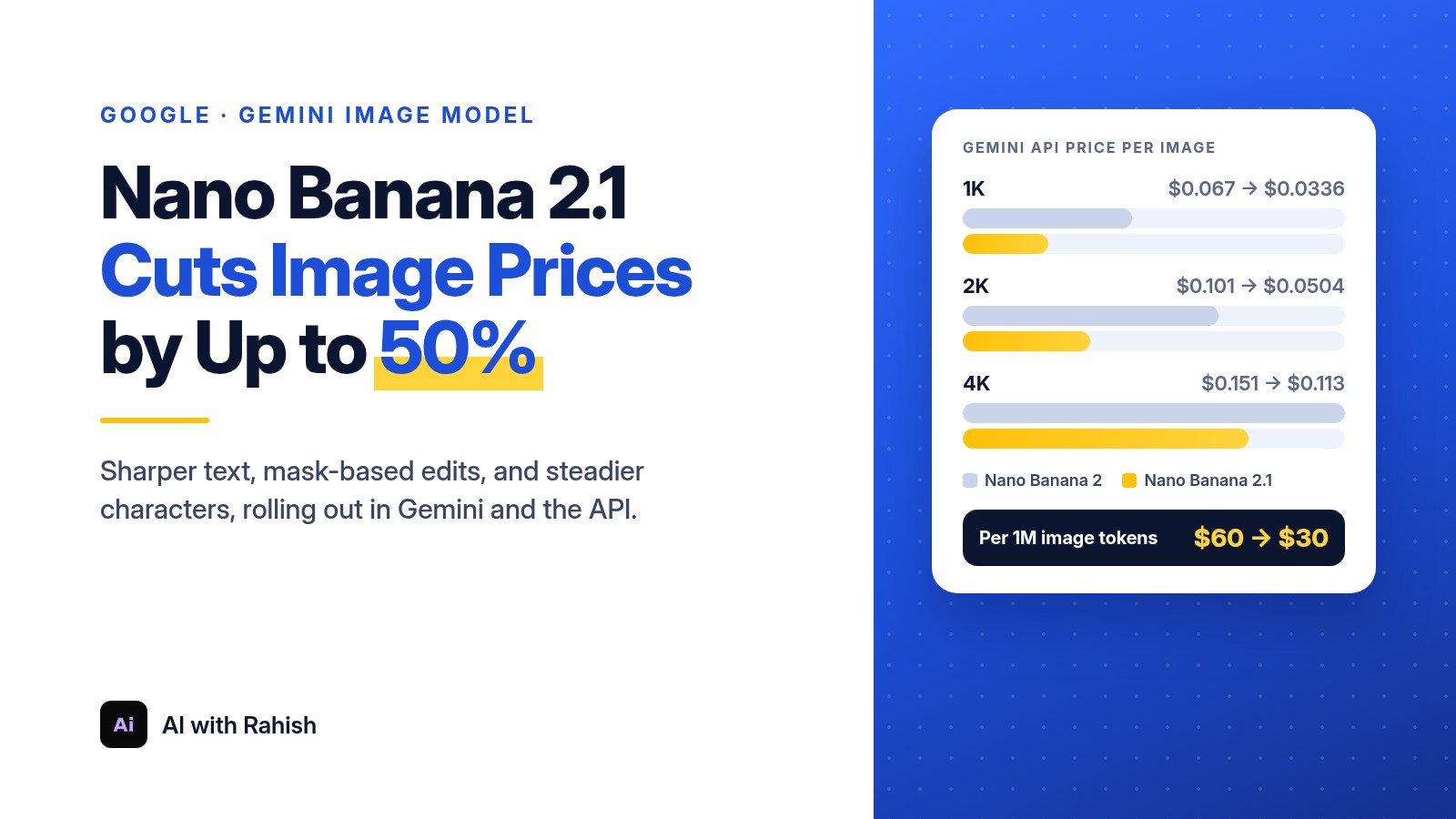
Google has rolled out Nano Banana 2.1, a new version of its Gemini image generation and editing model, and the headline for developers is the price. On the Gemini API, a 1K or 2K image now costs about half of what Nano Banana 2 charges, while Google says quality, text rendering, and editing all got better.
Google announced the update on October 6, 2026, saying in a social post that the model “outperforms our previous models across the board.” It is rolling out to the Gemini app, AI Mode in Search, Google AI Studio, the Gemini API, Google Flow, Stitch, Google Ads, and the Gemini Enterprise platform.
What Nano Banana 2.1 is
Nano Banana is Google’s name for its Gemini image models. Version 2.1 (model ID gemini-nano-banana-2.1) is an update to Nano Banana 2, which is Gemini 3.1 Flash Image. Google’s model card says 2.1 is built on Gemini 3.6 Flash, and the developer docs describe it as the faster, cheaper counterpart to Nano Banana Pro.
What Google says improved
- Visual quality and realism at 1K, 2K, and 4K output (1K is the default).
- Text rendering and infographic layout, long a weak spot for AI images.
- Mask-based editing, so you can change one part of an image and keep the rest.
- Character and object consistency across edits, with up to 14 reference images: up to 4 characters and up to 10 objects.
- Fixed tiling artifacts on very wide or tall formats like 4:1 and 1:8 at 2K and 4K.
- Grounding with Google Web and Image Search, plus thinking levels you can set to minimal, medium (the default), or high.
The new prices
These are Google’s standard paid-tier Gemini API prices for Nano Banana 2.1 compared with Nano Banana 2, per generated image:
- 1K image: $0.0336, down from $0.067.
- 2K image: $0.0504, down from $0.101.
- 4K image: $0.113, down from $0.151. That is about 25% cheaper rather than half, because a 4K image on 2.1 uses 3,780 output tokens versus 2,520 on Nano Banana 2.
The cut comes from image output dropping from $60 to $30 per million tokens. In practice, 1,000 images at 1K cost about $33.60 on 2.1 versus about $67 on Nano Banana 2. The Batch API halves the 2.1 price again, to $0.0168 at 1K and $0.0252 at 2K.
For context, Nano Banana Pro still lists at $0.134 for a 1K or 2K image and $0.24 at 4K.
The catches
- Inputs cost more. Input tokens rise from $0.50 to $1.50 per million, and text and thinking output rises from $3 to $7.50 per million. Heavy editing jobs with many reference images will see a smaller saving.
- No 512px tier. Nano Banana 2 offers a 0.5K size at $0.045; Google’s pricing page lists only 1K, 2K, and 4K for 2.1.
- No free API tier. The pricing page lists the free tier as not available, though the model can be tried in Google AI Studio.
How it scores
Google’s model card reports human side-by-side ratings (Elo scores, where higher is better). These are Google’s own numbers and have not been independently checked:
- Overall text-to-image preference: 1050 for Nano Banana 2.1 with thinking, versus 990 for Nano Banana 2 and 935 for Nano Banana Pro.
- Infographic factuality: 0.521, up from 0.179 for Nano Banana 2.
- Multi-character consistency in edits: 1106, versus 978 for Nano Banana 2.
Google also lists known limits: small text can still come out blurry at 1K, long paragraphs are hard, and left-right placement can get confused.
Why it matters
- Cheaper image apps. Products that generate thumbnails, ads, product shots, or social graphics at scale can roughly halve their image bill at 1K and 2K by switching one model ID.
- Usable text in images. Menus, posters, slides, and infographics are where most image models fail. If Google’s gains hold up, fewer images will need manual fixes.
- Price pressure on rivals. A big quality claim paired with a lower price raises the bar for every other image API.
The bottom line
Nano Banana 2.1 is a quality update and a price cut in one. For most 1K and 2K workloads it is the easy upgrade, but teams that send many reference images or rely on 512px output should run the numbers on their own traffic before switching.